
Stack A Butter Squishy Wiki

Stack A Butter Squishy Base Skins: Prices, Unlocks and How to Equip

Last updated:

Choose a new look for your base by comparing skin themes, discovery goals and cash prices. You can preview a design before committing to a purchase.

6 objects

Compare base appearances, discovery requirements, and cash prices.

Classic

Classic Base Skin

Appearance
Warm wooden starting base
Unlock requirement
Owned from the start
Price
—
Preview available
—
More details
Switching
Remains owned when another skin is equipped; equip Classic to restore the starting appearance.

Macaron Cafe

Macaron Cafe Base Skin

Appearance
Mint-and-pink macaron theme with a mint-green floor
Unlock requirement
—
Price
10000000 cash
Preview available
Yes (Before purchase)
More details
Purchase result
Becomes equipped after purchase
Visually inspired by
Macaron Butter

Blossom Garden

Blossom Garden Base Skin

Appearance
Soft pink cherry-blossom theme with a pink-and-white blossom-patterned floor
Unlock requirement
Find a Legendary (Discovery gate)
Price
500000000 cash (When the purchase option is available)
Preview available
Yes (Before purchase, including when cash is below the purchase price)
More details
Purchase result
Becomes equipped after purchase
Visually inspired by
Blossom Butter

Ice Cream Parlor

Ice Cream Parlor Base Skin

Appearance
Yellow floor with ice-cream scoops, sprinkles, and cherry decorations
Unlock requirement
Find a Mythic (Discovery gate)
Price
—
Preview available
Yes (Available while the skin is Locked)
More details
Visually inspired by
Icecream Butter

Ube Dream

Ube Dream Base Skin

Appearance
Purple starry theme inspired by Ube Butter
Unlock requirement
Find a Celestial (Discovery gate)
Price
—
Preview available
Yes (Available while the skin is Locked)

Mint Choco Heaven

Mint Choco Heaven Base Skin

Appearance
Mint-green base theme
Unlock requirement
Find a Divine (Discovery gate)
Price
125000000000000 cash (When the purchase option is available)
Preview available
—

Base Skin Collection and Unlock Goals

Classic is the wooden starting base. Macaron Cafe offers a mint-and-pink look for $10M, while Blossom Garden is a pink cherry-blossom option with a Legendary discovery goal and a $500M purchase price when available.

Ice Cream Parlor, Ube Dream and Mint Choco Heaven have Mythic, Celestial and Divine discovery goals respectively. Mint Choco Heaven has a $125T purchase option when available. A discovery goal and a cash purchase are separate requirements.

For help finding the required rarities, see the butter index and the Legendary and Mythic collection guide.

Preview a Skin on Your Base

  1. Approach the Base Skins sign at your base and choose Open. On a keyboard, press E.
  2. Select a skin and choose Preview on my base.
  3. Look around your temporarily changed base, then select Done or let the countdown finish. Your equipped appearance returns.

You can preview Blossom Garden even if you do not have its $500M price. Ice Cream Parlor and Ube Dream can also be previewed while their discovery requirements are still locked.
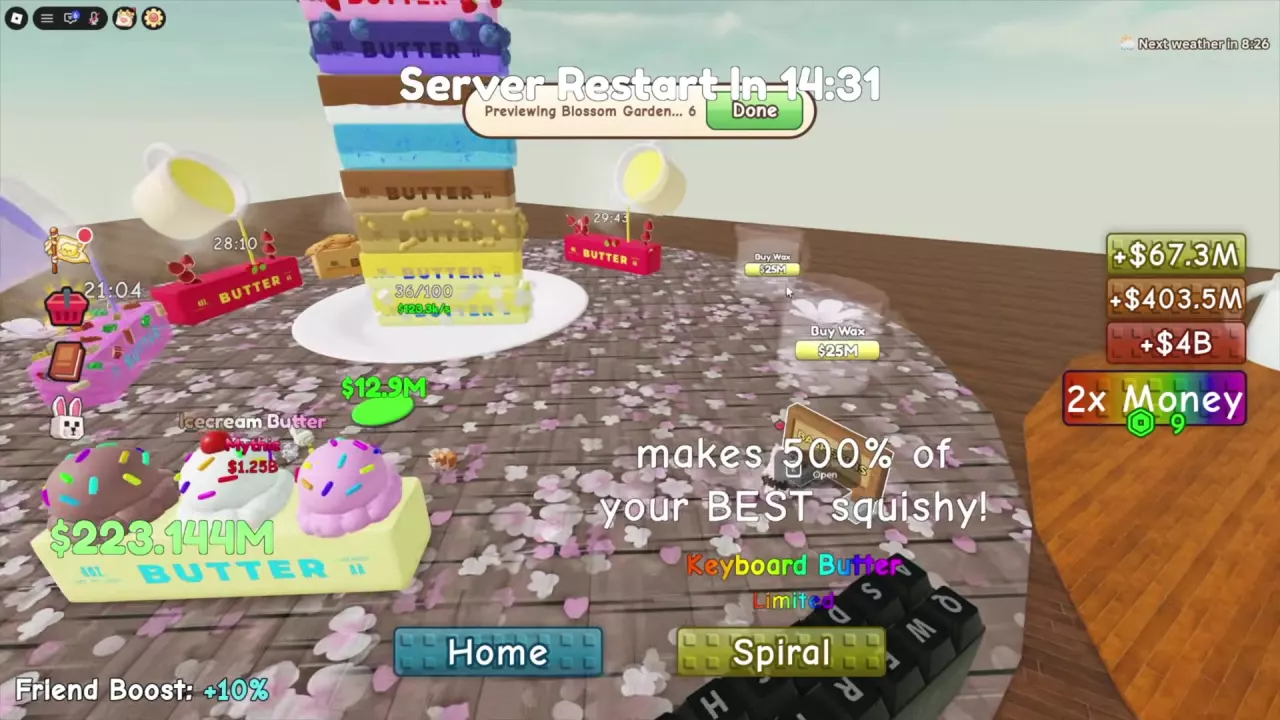
Blossom Garden preview on a base with a countdown and Done button

Buy, Equip and Restore Classic

  1. Open Base Skins and select the appearance you want.
  2. Meet any displayed discovery requirement and have enough cash for the price. Choose Buy when the purchase option is available.
  3. Look for Equipped to identify the active appearance. Macaron Cafe and Blossom Garden become equipped after purchase.
  4. To change back, select an owned skin and equip it. Choose Classic to restore the wooden starting base.

Owned means the skin remains in your collection; Equipped marks the one currently in use. Classic stays owned after you switch away.

Your first base-skin purchase while in a guild grants 150 Guild XP. VIP includes base customization, while the skin collection has its own cash prices and discovery requirements.